Agentflow
Last updated:
Arrange defined steps into a workflow
Agentflow means Agent Workflow. Agents reason and act; Agentflow routes work and executes predefined steps. Connect nodes on the canvas to define what happens first, who receives each result, and where human confirmation is required.
For example, an organizing agent decides which information to retain, and a reviewing agent checks for omissions and unclear wording. Agentflow sets the sequence: organize, review, then request human confirmation.
Route work between steps
| Task requirement | How Agentflow arranges it |
|---|---|
| Follow a fixed sequence | Direct passes results to the next step |
| Select a path by condition | If / Else If checks conditions in order and sends the message only to the first matching branch; Else runs when none match |
| Run independent tasks together | Fan Out distributes work across branches; a Concurrent block calls its members in parallel |
| Wait for branch results | Fan-in Barrier waits for all sources in the same group before continuing |
| Request confirmation or more information | Human Gate pauses the workflow for a human response |
Agents interpret content, generate text, and call tools. Agentflow defines the connections and branching rules between steps, making it possible to inspect whether required reviews and confirmations are included.
Example 1: Coding, review, and commit
Coding tasks often follow a defined sequence: implement, review, revise if needed, then commit after confirmation. Agentflow lets different agents work in the same Project workspace while a person decides whether to proceed.
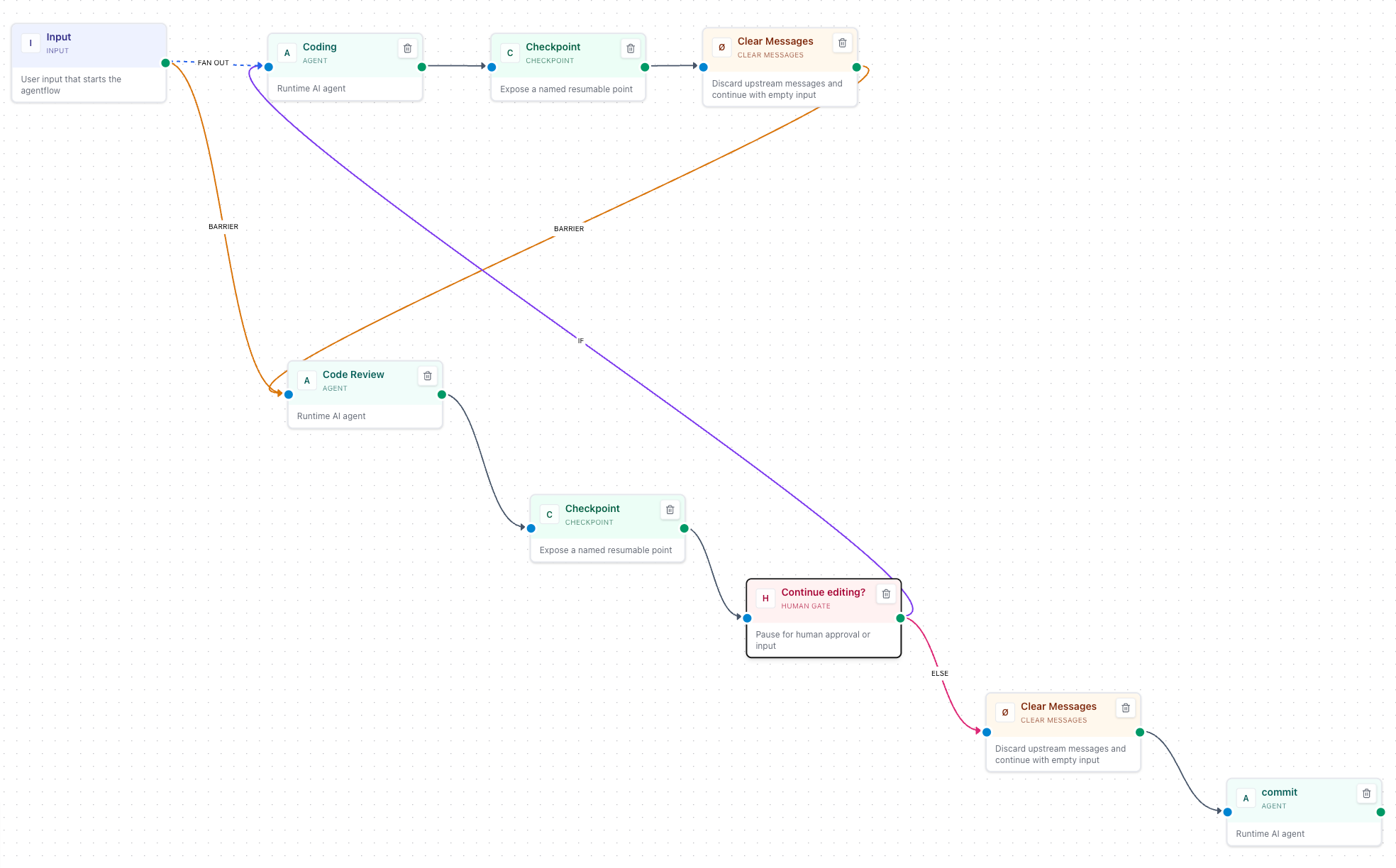
The workflow assigns these responsibilities:
- Coding uses Codex to implement changes in the current workspace.
- Checkpoint and Clear Messages mark a recovery boundary and discard upstream messages passed downstream, allowing the reviewer to inspect the workspace diff under its own instructions.
- Code Review uses Claude Code to review changes and report issues, followed by another Checkpoint.
- Human Gate asks a person whether further changes are needed. Revisions return to Coding; completed work proceeds to the Commit Agent.
- Commit Agent creates a Git commit according to the confirmed requirements.
Configure Codex, Claude Code, and Git in the execution environment, and confirm that each node accesses the same Project workspace. Give implementation, review, and commit nodes distinct instructions. Verify the complete path with a small change, then test the revision path.
Express revisions through human feedback and If / Else If conditions. Set the Human Step Mode to Input so a person replies in Response: for example, “revise” returns to Coding and “done” proceeds to the commit. Approval mode offers only Reject and Approve and collects no text, so conditions cannot read human feedback. Interrupt in Input mode and Reject in Approval mode both stop the workflow; neither takes the revision branch. The loop must have an explicit exit path.
Agentflow fixes responsibilities, order, and human decision points. You still need to check tests, resolved review findings, and the final diff. See the Agentflow guide for checkpoint recovery conditions.
Example 2: Extract locations from Xiaohongshu notes
A travel planning application can split “import a note and show its places on a map” into three data processing steps. Agentflow connects those steps and returns location data to the business system; the frontend handles the map display.
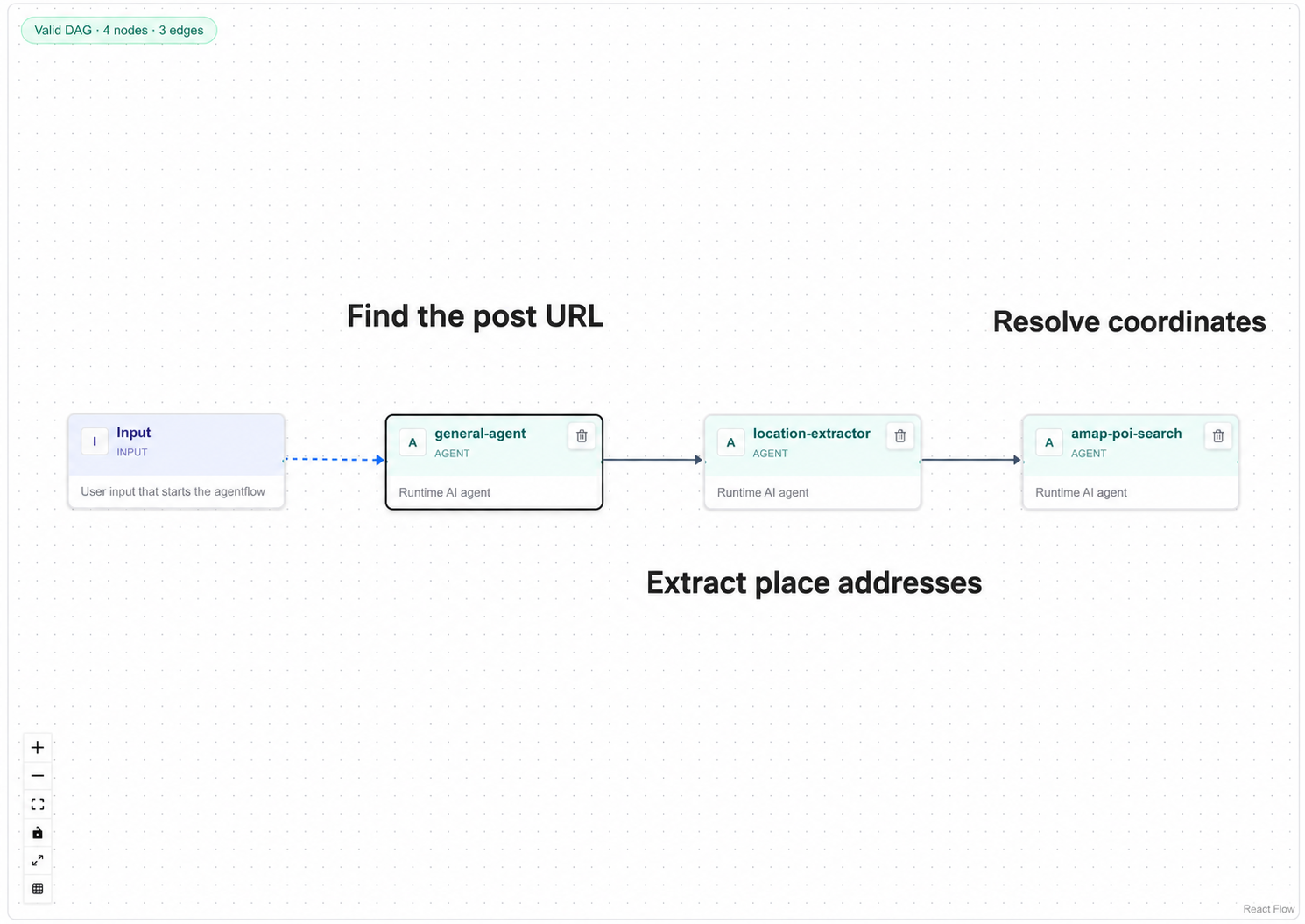
| Step | Processing | Result passed onward |
|---|---|---|
| Retrieve note details | An agent uses xhs-explore from xiaohongshu-skills to read a Xiaohongshu URL | Note content |
| Extract candidate places | The model interprets the content and extracts place names and addresses | Candidate places and addresses |
| Match locations | An agent calls the Amap MCP service to search for POIs (points of interest, such as attractions or restaurants) | Places and coordinates for the business system |
Prepare and configure the example’s Skill, Amap MCP service, and required accounts or credentials. Verify that the execution nodes can call them. These are dependencies of the example; creating an Agentflow alone does not provide those service capabilities.
Start with a note containing clearly identified places. Check that the content was retrieved, the extracted places came from the note, and each POI matches the correct city and address. Duplicate place names, incomplete addresses, and missing search results require more information or human review before treating candidate coordinates as confirmed locations.
Tools retrieve notes and query locations, the model interprets text and extracts places, and Agentflow passes results between steps in order. The business UI remains responsible for displaying the map.
Get started
- Prepare and individually verify the agents you need, such as an organizer and a documentation reviewer.
- Open the Agentflows editor and connect Input, two Agent nodes, Human Gate, and Output.
- Define each Agent node’s task. Set the Human Gate’s Human Step Mode to Approval and write the confirmation prompt.
- Save, select the Agentflow in Chat, and submit a short passage. Chat shows the input each node receives in the current turn as it runs; use it to check execution order, human confirmation, and the final output.
- Add conditional branches or parallel work after the basic path succeeds, then verify each path.
The workflow rules are predefined
Predefined steps do not mean the model returns identical answers on every run. Agents still assess their inputs, and conditional branches select paths from runtime results. Choosing Reject or Interrupt at a Human Gate stops the workflow.
Agentflow also supports dynamic collaboration through blocks such as Handoff and Magentic. Use explicit sequential edges when every step must execute; choose dynamic orchestration when the task calls for handoffs or planning.
Read the Agentflow guide · Explore custom agents