Projects, files, and workspaces
Last updated:
A Project keeps a task’s directories, background information, and conversations together. For a code repository, you might create separate conversations for code exploration and troubleshooting while using the same workspace.
The account running AGW Server must be able to access these directories. Saving a Project creates a missing primary directory automatically; additional directories must already exist, use an absolute or ~ path, and not duplicate another directory. With a remote Server, enter a path on that host. With Docker, enter the path inside the container.
Configure the workspace
- Create a Project and set its Primary directory (required). In the Projects form in Settings, typing a name pre-fills
~/.agw/<project folder name>; when creating a Project from the Desktop title bar, leaving Workspace (optional) empty uses the same path. - Add Additional directories for other browsing roots. Each association has a stable ID; changing its path creates a new ID.
- In the Chat workspace’s Files view, switch roots with the directory dropdown and verify file and Git access; see File browsing and Git change review.
- Run an agent in the Project and verify that it uses the intended primary working directory.
The Project form also has Tools, Skills, MCP Tool Server, Integrations, and Environment Variables tabs. At run time these settings merge with a custom agent’s own configuration, which suits capabilities shared across the Project.
Switching the browsing root does not change the agent’s working directory. Removing an additional-directory association does not delete files. Mount network storage through the OS or container platform first, then configure the mounted path as the workspace.
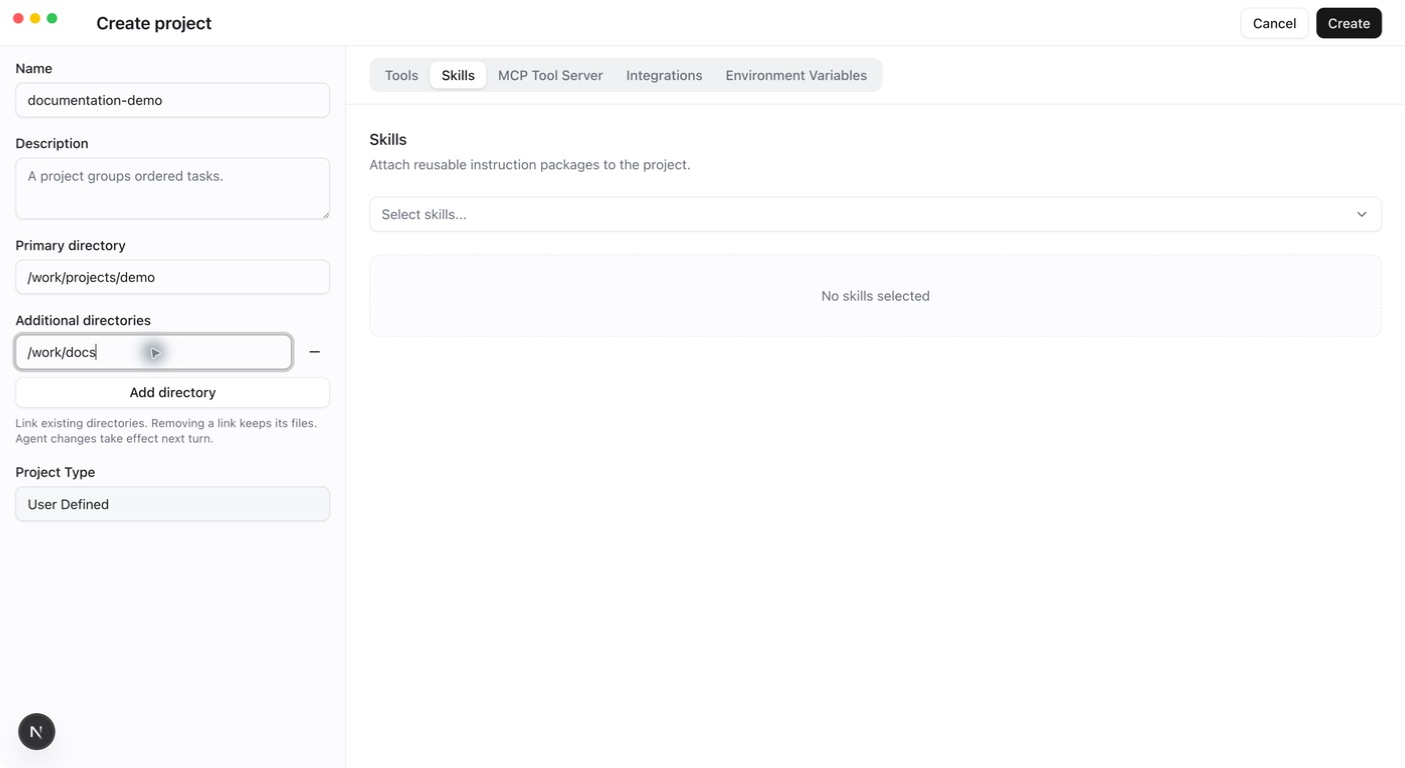
Example: code and reference directories
Suppose code is in /work/app and reference material is in /work/reference. Set the former as Workspace and add the latter as an additional directory. Browsing reference material in Files leaves the agent’s default working directory at /work/app. Tell the agent where the reference material is and give it the required reading capability.
For Docker, mount the directories first. If the host’s /home/me/app is mounted at /work/app in the container, enter /work/app as Workspace. Entering a path in the form does not create a container mount.
A custom agent’s instructions list the primary directory and each additional directory, using the folder name as an alias. In conversation, refer to a directory by its alias, or to the primary directory as default.
When a Project is created through the API without a workspace, the Server uses ~/.agw/projects/{projectId:N}, where {projectId:N} is the Project ID without hyphens.
When changes apply
Project updates invalidate the local filesystem cache and refresh file browsing immediately. Agents capture immutable directory snapshots at the start of each turn. Changes rebuild the runtime on the next turn while preserving conversation identity. Active turns, child execution, and durable recovery retain their captured paths.
Every distributed execution node must see the same captured host paths. An unavailable or foreign additional directory fails without falling back to the primary root.
Troubleshoot
For missing files, verify the selected browsing root, mount, execution account, and Server-side path. A different directory in your local terminal is not sufficient evidence. Non-built-in Projects can be copied. A copy keeps Tools, Skills, MCP Tool Server, Integrations, and environment variables, but its primary directory becomes ~/.agw/projects/{newId:N} and it has no additional directories; set the directories again after copying.